
Home / Features / news autoblogging
News ModeNews Autoblogging: Turn Recent Google News Into Fresh Articles
News Mode is Autoblogging.ai's news autoblogging tool: give it a topic and it finds recent stories in Google's news results, reads up to five source articles and writes one new article with a fresh headline. Run it once, or set up a campaign that writes a set number of articles on a time gap and posts them to your site.
- 1 credit per news article
- Starter plan and up
- News from the last 2 hours to 30 days
What is news autoblogging?
News autoblogging means publishing articles about current news automatically, on a schedule, instead of writing each story by hand. In Autoblogging.ai, News Mode searches recent news for your topic, picks a story, reads several sources on it and writes a new article in the persona and style you set, then can post it to WordPress or another connected platform. A campaign repeats that on a time gap and skips stories it has already covered.
News autoblogging: before and after
News topic and the sources the run used
Topic: Google Search
Freshness: 24_hours
Generated news article: "Google Moves Away from Practice Problem Structured Data in Search Results" (opening and summary)
Google has announced it will discontinue support for certain structured data types, aiming to simplify the user experience on its Search results page with minimal impact on rankings.
- Google is phasing out seven types of structured data deemed underused.
- The removal aims to streamline the Search results interface without affecting page rankings.
- Website owners are encouraged to adapt and focus on supported structured data types.
- Sources the run read: developers.google.com, searchenginejournal.com, relevantaudience.com, gtechme.com
Real output from an Autoblogging.ai run, copied as stored and shortened.
How the news autoblogging works
Pick single or campaign
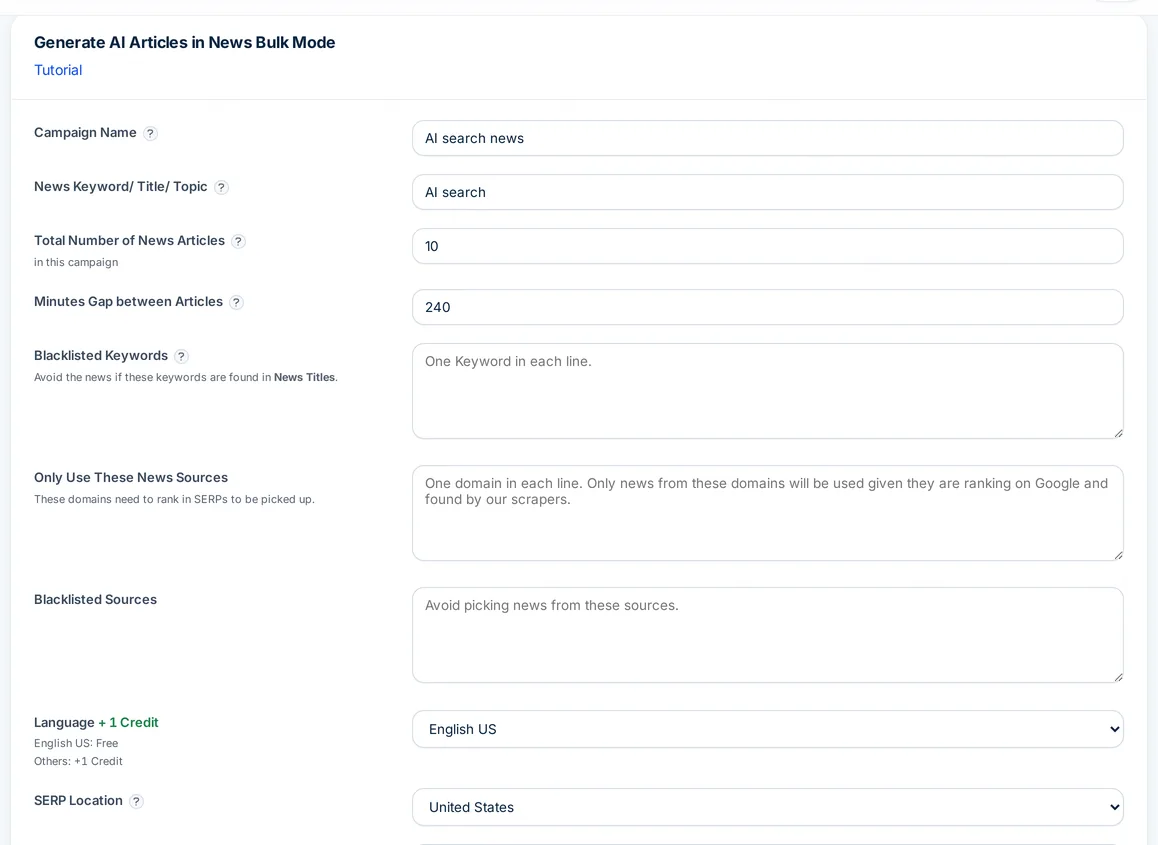
Open Generate, News. Single writes one article now; Bulk Generate creates a campaign with a name, a total number of articles and the minutes between them.
Set the topic and filters
Enter the news topic, the SERP location and the recency, from under 2 hours to 30 days. Optionally list the only sources to use, sources to block and keywords to avoid.
Shape the article
Add an author persona, a writing style, source context and up to 10 internal links in URL | Anchor format, then choose the language and AI images.
Publish and track
Tick Auto Post to Platform to send each article to a connected site as a draft or live post. News Articles in your history lists every article and the reason for any failed run.
What News Mode gives you
Every setting is about writing on real, recent stories from sources you trust.
Recency control
Use only news from the last 2, 6, 12 or 24 hours, or the last 3, 5, 7, 15 or 30 days.
Source allow list
Name the only domains to use. If the news results have nothing from them, News Mode searches those sites directly.
Blocked sources and keywords
Keep chosen domains out of your sources. If a headline in the results contains a blocked keyword, that run stops and its credits are returned.
Multi-source articles
Reads up to five articles on the story and writes one new article from them, under a new headline.
Author persona and style
Write as a persona you describe in up to 200 characters, in a style of up to 100 characters, with source context to set the angle.
Internal links
List up to 10 of your URLs with anchor text and they are linked where relevant, for 1 extra credit.
Scheduled campaigns
Set how many articles and the minutes between them. If a run lands on a story the campaign already covered, it is skipped and refunded.
Images and schema
Four AI images, on by default for 1 credit. In single mode, Smart Schema (2 credits) can add NewsArticle markup.
Languages and auto-posting
Write in 38 languages and post to a connected WordPress, Shopify, Webflow, Ghost or Zapier account.
News Mode pricing
A news article costs 1 credit. AI images, on by default, add 1; internal links add 1; a language other than English adds 1; and in single mode Smart Schema adds 2. A campaign is charged for all its articles when you create it, and any article that fails is refunded automatically. News Mode is included from Starter ($19 a month).
News autoblogging FAQ
What is news autoblogging?
Publishing articles about current news on autopilot. Autoblogging.ai's News Mode finds recent stories for your topic, writes a new article from several sources and can post it to your site on a schedule.
How much does news autoblogging cost?
1 credit per article, plus 1 for AI images (on by default), 1 for internal links and 1 for languages other than English. It is included from the Starter plan.
Where does News Mode get its news?
From Google's news search results for your topic and country, filtered by the recency you choose. It then reads up to five source articles on the story.
Can I limit news autoblogging to specific sites?
Yes. List the only domains to use, or block domains and keywords. With an allow list, it searches those sites directly when the news results have nothing from them.
Is the article a copy of one source?
No. It is written fresh from up to five sources on the same story, under a new headline, guided by your author persona, writing style and source context.
What happens if no news is found?
The run stops and its credits are refunded automatically. News Articles in your history shows the reason, such as no recent articles or every source filtered out.
Related tools
Get started with the news autoblogging
Create a free account with 10 free credits a month for Quick Mode, then unlock the news autoblogging on the Starter plan ($19 a month) or above. No credit card required to sign up.
Start free →