
Home / Features / link prospecting tool
Outreach prospectsLink Prospecting Tool: Find Relevant Sites and Contact Emails From Your Article
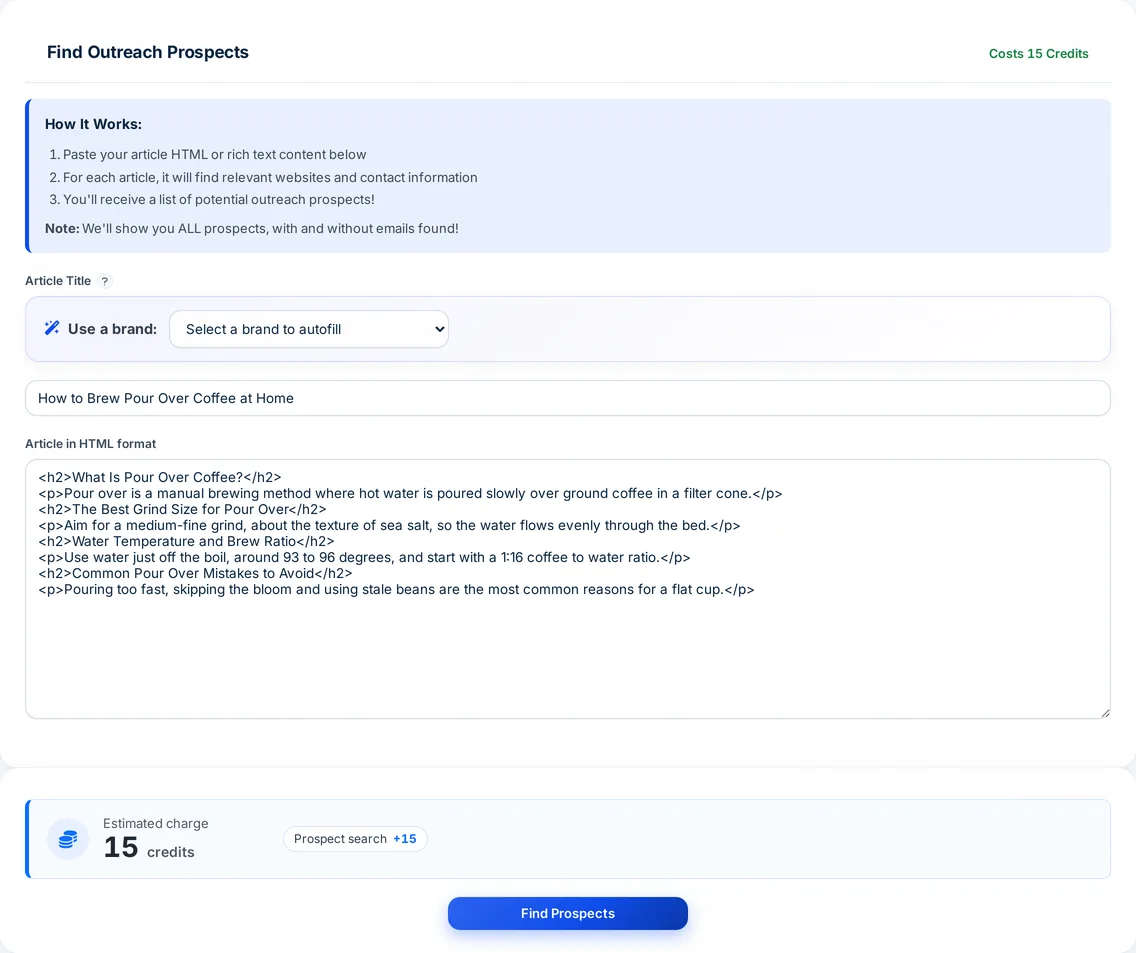
Autoblogging.ai's link prospecting tool turns one of your articles into an outreach list. It searches Google for each topical heading in the article, keeps the results an AI check marks as relevant, and looks for contact emails on each page and its contact and about pages. You get every prospect, with or without an email, ready to export as CSV.
- 15 credits per run
- Starter plan and up
- CSV export
What is a link prospecting tool?
A link prospecting tool finds websites likely to link to your content, and the people to contact there. Autoblogging.ai works from your own article: its headings become Google searches, so the prospects are pages already ranking for the subtopics you cover. Each run returns the page URL, its title and any contact emails found, split into prospects with and without emails.
Link prospecting tool: before and after
Headings of the article "What is n8n? Workflow Automation and Applications" (first 5 of 13 kept)
- What is Workflow Automation?
- Key Features of n8n
- n8n Usage Statistics for Data Quality Reports
- Visual Workflow Builder
- Integrations and Nodes
- …
Prospect pages found for the first heading (page title and URL only)
Heading: What is Workflow Automation?
- What is Workflow Automation and Why is it Important?
https://www.techtarget.com/searchcontentmanagement/definition/workflow-automation - What Is Workflow Automation? An Overview With Examples
https://www.workato.com/the-connector/workflow-automation-guide/ - What is Workflow Automation? - A Complete Overview
https://kissflow.com/workflow/workflow-automation/ - Workflow Automation: Definition, Benefits & How to Get ...
https://www.creatio.com/glossary/workflow-automation - What is workflow automation? A complete guide
https://www.pega.com/workflow-automation - …
- Run summary: 22 headings found, 13 kept, 314 prospect pages (22 for this heading)
- Contact emails exist in the stored result but are deliberately not copied
Real output from an Autoblogging.ai run, copied as stored and shortened.
How the link prospecting tool works
Paste your article
Open Outreach Prospects under Research, give the run a title and paste the article HTML (up to 50,000 characters), or pick a brand and one of its generated articles.
Headings become searches
Generic headings such as Introduction, Conclusion and FAQs are dropped, and each remaining heading is searched on Google.
Relevant sites are kept
An AI check compares each result title with its heading and keeps the relevant pages, then looks for emails on the page and its contact and about pages.
Export and reach out
Open the run from your history: see the totals, browse prospects with and without emails, copy every email or export everything to CSV.
What the link prospecting tool gives you
Prospects matched to what your article actually covers, with contact details where they are public.
Searches from your headings
Every topical heading in the article is searched on Google, so prospects match the subtopics you cover.
Generic headings filtered out
Introduction, Conclusion, Summary and FAQ style headings are removed before any search runs.
AI relevance check
Up to 50 results per heading are checked against that heading, and only the relevant pages are kept.
Contact email finder
Emails are looked for on the ranking page first and, if none are there, on its /contact, /about, /contact-us and /about-us pages.
Duplicates removed
An email found on several pages is listed once, under the first prospect it appeared on.
With and without emails
Prospects are split into two tabs, so sites without a public email are kept for manual outreach.
CSV export and copy
Export all prospects (URL, title, emails) to CSV, or copy every email to your clipboard at once.
Automated outreach in bulk
In bulk and WordPress bulk, Outreach Prospects runs on each published article and emails the prospects from your own connected inbox, with up to three follow-ups.
Sending limits built in
Automated emails go out 10 minutes apart, at most 80 per sending inbox in any 24 hours, and each address is checked with its mail server first.
Link prospecting tool pricing
Each run of the link prospecting tool costs 15 credits and is included on every paid plan, from Starter at $19 a month. In bulk and WordPress bulk, Outreach Prospects adds 15 credits per article, or 18 with personalized AI emails.
Link prospecting tool FAQ
How does the link prospecting tool find prospects?
It reads the headings in your article, drops generic ones, searches Google for each remaining heading and keeps the results an AI check marks as relevant. Then it looks for contact emails on each page and its contact and about pages.
How much does the link prospecting tool cost?
15 credits per run, on any paid plan from Starter ($19 a month).
Does it show domain authority or traffic?
No. Each prospect comes with its URL, page title and any emails found. Check authority in your own SEO tool before you reach out.
What if no email is found for a site?
The site is still listed under Prospects Without Emails, so you can contact it another way. Domains with no email are remembered and searched again after 30 days.
Can it send the outreach emails for me?
Yes, in bulk and WordPress bulk. With auto-posting to WordPress set to Publish, it emails each prospect from your connected inbox, templated or personalized by AI, with follow-ups 3, 5 and 10 days later.
How long does a run take?
The dashboard estimates 5 to 10 minutes, because every heading is searched and every page is checked for emails. Runs are saved in your history.
Which country are the searches run in?
Prospect searches run on Google in the United States.
Related tools
Get started with the link prospecting tool
Create a free account with 10 free credits a month for Quick Mode, then unlock the link prospecting tool on the Starter plan ($19 a month) or above. No credit card required to sign up.
Start free →