
Home / Features / topical authority map
Topical MapsTopical Authority Map: Plan Your Site Around One Central Entity
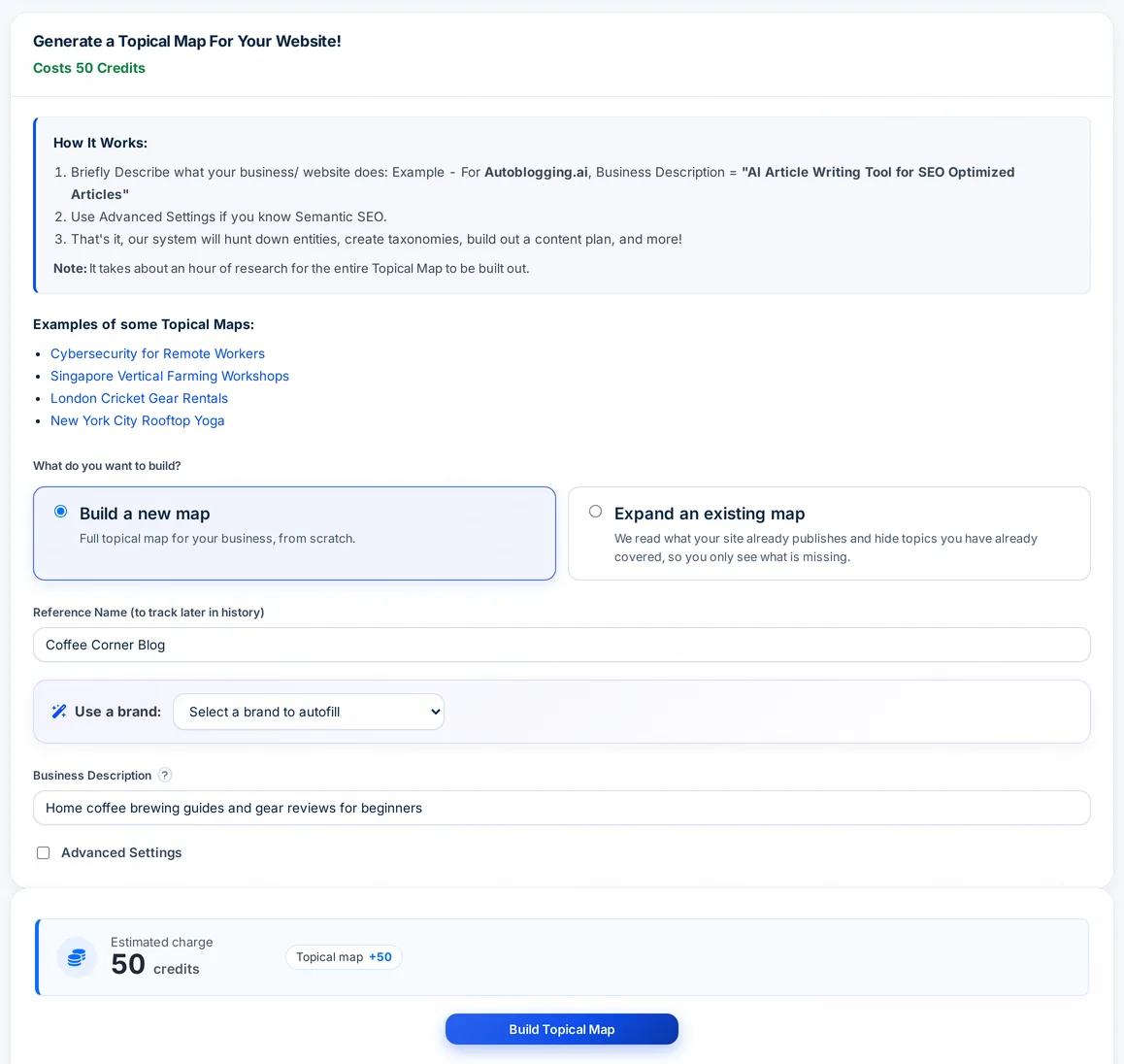
Autoblogging.ai's Topical Maps builds a topical authority map from a short description of your business. It defines your central entity and search intent, gathers related entities, researches the pages already ranking in each category, then returns a taxonomy split into core and outer sections and a content plan of article titles, each with its section, article type and a source context to write from.
- 50 credits per map
- Regular plan and up
- Free maps every month
What is a topical authority map?
A topical authority map is a plan of everything a site needs to cover to be treated as an authority on its subject. It starts from a central entity, the thing the site is about, breaks it into a taxonomy of sub-topics, separates the core section that serves your main search intent from the outer section that supports it, and lists the articles each branch needs. Publishing along that structure, with each cluster linked to its pillar, is the usual way to build topical authority.
Topical authority map: before and after
What was entered
Topic: Japan Travel Guide
Business description: An independent travel blog for first-time and repeat visitors to Japan. It covers when to go, where to go, how to get around, what things cost, and how to plan a two-week trip without a tour group.
Central search intent: Plan a trip to Japan
Excerpt of the stored map: central entity and one category
Central entity: Travel in Japan - Tokyo, Kyoto, Osaka, Hokkaido and the wider country
Category: Tohoku Travel (26 titles, Core section)
- Best Time to Visit Tohoku: Seasonal Guide & 7-Day Itinerary
- Tohoku with a JR Pass: Rail Coverage, Routes & Itinerary Tips for First-Timers
- Tohoku Onsen Guide: Best Hot Springs, Towns & Etiquette for Your Japan Trip
- Tohoku Food Guide: Local Dishes, Sake, and Where to Eat (2026 Travel Tips)
- First-Time Tohoku Travel: Etiquette, Ryokan & Onsen Tips
- …
- Map totals: 798 titles in 37 categories (645 Core, 153 Outer)
- Central entity is stored with a plain hyphen: "Travel in Japan - Tokyo, Kyoto, ..."
Real output from an Autoblogging.ai run, copied as stored and shortened.
How the topical authority map works
Choose new or expand
Build a new map from scratch, or expand an existing one: enter your domain and it reads your sitemap so it can hide topics you have already published.
Describe the business
Give the map a reference name and a one-line business description. A city or country you mention sets where Google is searched; otherwise it is the United States.
Add advanced settings (optional)
If you know semantic SEO, set the central entity, central search intent, target audience and source context yourself. All four are required once you switch this on.
Build and review
Click Build Topical Map. It runs in the background (the dashboard allows up to an hour) and opens from History > Topical Map with the taxonomy, a zoomable diagram and the content plan.
What a topical authority map includes
Every map is researched from Google results for your market and saved, so you can come back to it and filter it as you publish.
Central entity and search intent
The subject your site is about, checked against Wikipedia, and the main job your reader wants done.
Entities and relationships
Related entities gathered from reference sites such as Wikipedia and Britannica, with subject, predicate and object triples.
Taxonomy and ontology
Your topic broken into categories up to five levels deep, with a zoomable diagram of the whole tree.
Core and outer sections
Which branches serve your main search intent directly and which support it from the edges.
Audiences and tools
The audience segments and the tools and platforms that matter in your niche.
Query templates
Informational, commercial, transactional, navigational, local and audience-specific query patterns for your central entity.
Content plan
Article titles researched from what already ranks in each category, at most 30 per category, each with its section, article type and source context.
Expand an existing site
Compare the map with the pages already live on your domain and switch between the complete map and only the topics you have not published.
Filter and copy
Filter the plan by title, section or level, copy all or filtered rows, and copy the taxonomy into WordPress categories with the free Bulk Categories Creator plugin.
Topical authority map tutorial
Topical map pricing
A topical map costs 50 credits. Topical Maps are included from the Regular plan ($49 a month, 120 credits), and every plan from Regular up includes free maps each month that are used before any credits are charged. Free maps refill at each renewal and do not roll over.
| Plan | Starter $19/mo | Regular $49/mo | Standard $99/mo | Gold $179/mo | Premium $249/mo | Enterprise $999/mo |
|---|---|---|---|---|---|---|
| Free topical maps per month | Not included | 1 | 1 | 2 | 5 | 10 |
Topical authority map FAQ
What is a topical authority map?
A plan of every article a site needs to cover its subject, organised around one central entity, split into core and outer sections and grouped into clusters. Autoblogging.ai builds one from a short description of your business.
How much does a topical authority map cost?
50 credits per map. Regular and Standard include 1 free map a month, Gold 2, Premium 5 and Enterprise 10, and the free maps are used first.
Which plan do I need for topical maps?
Regular ($49 a month) or above. The Free and Starter plans cannot build topical maps.
How long does a map take to build?
It researches Google results for every category, so it runs in the background; the dashboard allows up to an hour. You can leave the page and open the map from History > Topical Map.
Can it skip topics my site already covers?
Yes. Choose Expand an existing map and enter your domain. It reads your sitemap (or crawls the site if there is none), and you can switch between the complete map and only the topics you have not published.
What are the advanced settings?
Central entity, central search intent, target audience and source context (up to 1,000 characters). Set them if you already know how the site should be framed; otherwise they are worked out from your business description.
How do I turn the map into articles?
Create the map's categories in WordPress with the Bulk Categories Creator plugin, then copy the titles from the content plan into the bulk article generator, one cluster at a time.
Related tools
Get started with the topical authority map
Create a free account with 10 free credits a month for Quick Mode, then unlock the topical authority map on the Regular plan ($49 a month) or above. No credit card required to sign up.
Start free →