
Home / Features / content repurposing tool
Content repurposerContent Repurposing Tool: Rewrite and Translate WordPress Posts for Your Other Sites
Autoblogging.ai's content repurposing tool takes posts from one of your WordPress sites, rewrites each one to be unique, optionally translates it, and publishes it to your other WordPress sites. You pick the source posts, choose destination sites with a category and post status for each, and add your own rewriting instructions and one of 38 output languages.
- 2 credits per article per site
- 38 output languages
- Needs 2 connected WordPress sites
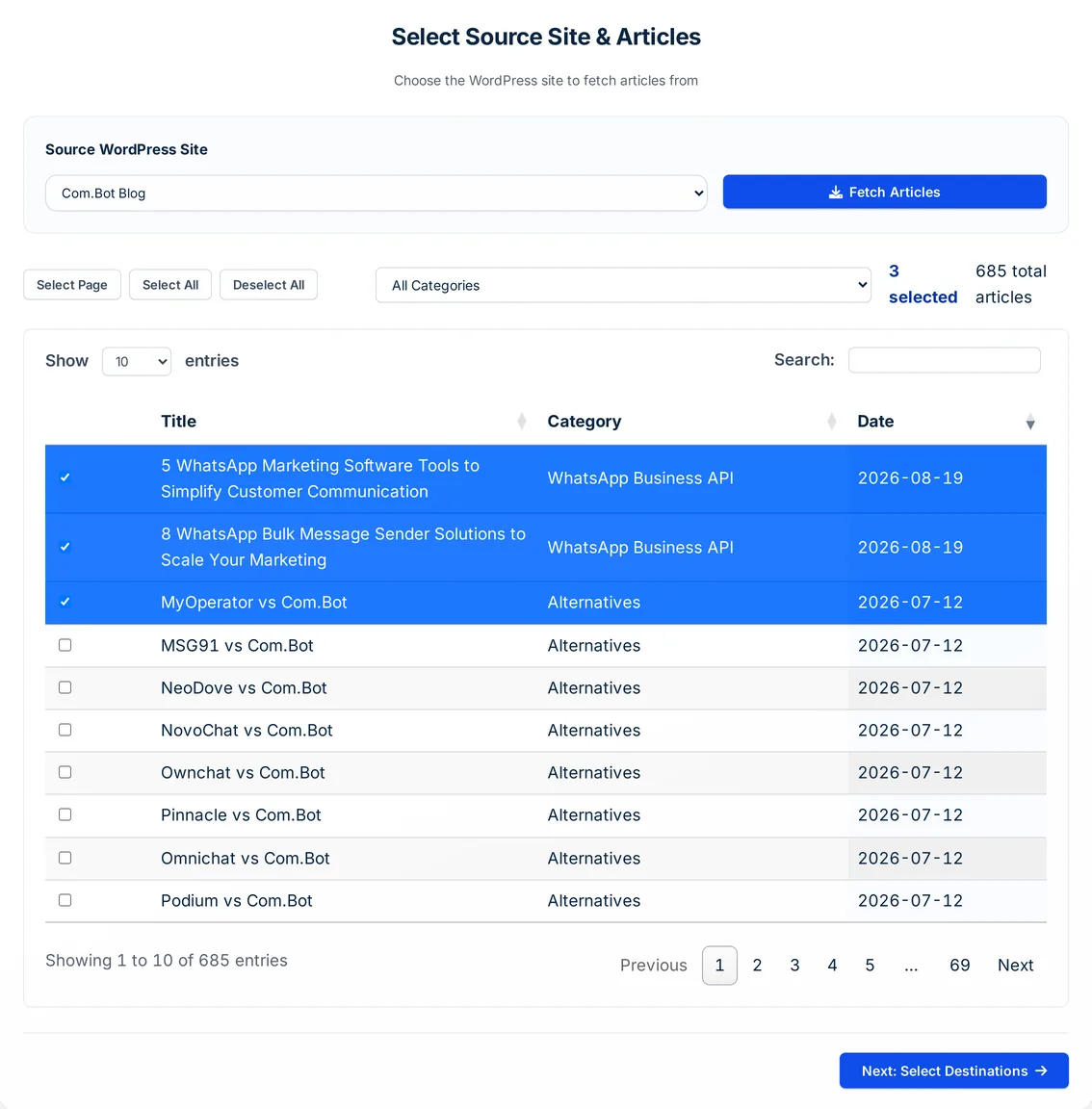
What is a content repurposing tool?
A content repurposing tool reuses content you already have in a new form or place instead of writing from scratch. Autoblogging.ai's version is built for people who run several WordPress sites: it fetches posts from one site, rewrites each one with your instructions so it is not a copy, can translate it, and posts it to the destination sites you choose.
Content repurposing tool: before and after
Source post section (English, from a connected WordPress site)
Acts of service gifts demonstrate love through effort, like preparing his favorite breakfast-in-bed or organizing a surprise scavenger hunt, resonating with 23% of men per Love Languages research. These practical surprises for your boyfriend's birthday show commitment via action, perfect for hands-on types. Allocate time wisely to avoid overcommitting, a common mistake that leads to stress.
…Repurposed section (Hindi, "Use shorter paragraphs")
सेवा के कार्य गिफ्ट्स एफर्ट से लव दिखाते हैं। लव लैंग्वेज रिसर्च के अनुसार 23% पुरुषों को पसंद।
ब्रेकफास्ट-इन-बेड या स्कैवेंजर हंट बनाएं। हैंड्स-ऑन टाइप्स के लिए परफेक्ट।
टाइम मैनेज करें, स्ट्रेस से बचें।
…- Custom instructions: Use shorter paragraphs
- Language: Hindi
- Source title: What To Get Boyfriend For Birthday: A Simple Explanation To Help You Navigate Feelings
- Pushed as: draft
Real output from an Autoblogging.ai run, copied as stored and shortened.
How the content repurposing tool works
Pick the source site
Open Content Repurposer under Optimize, choose one of your connected WordPress sites and click Fetch Articles. Filter by category and select the posts.
Choose destinations
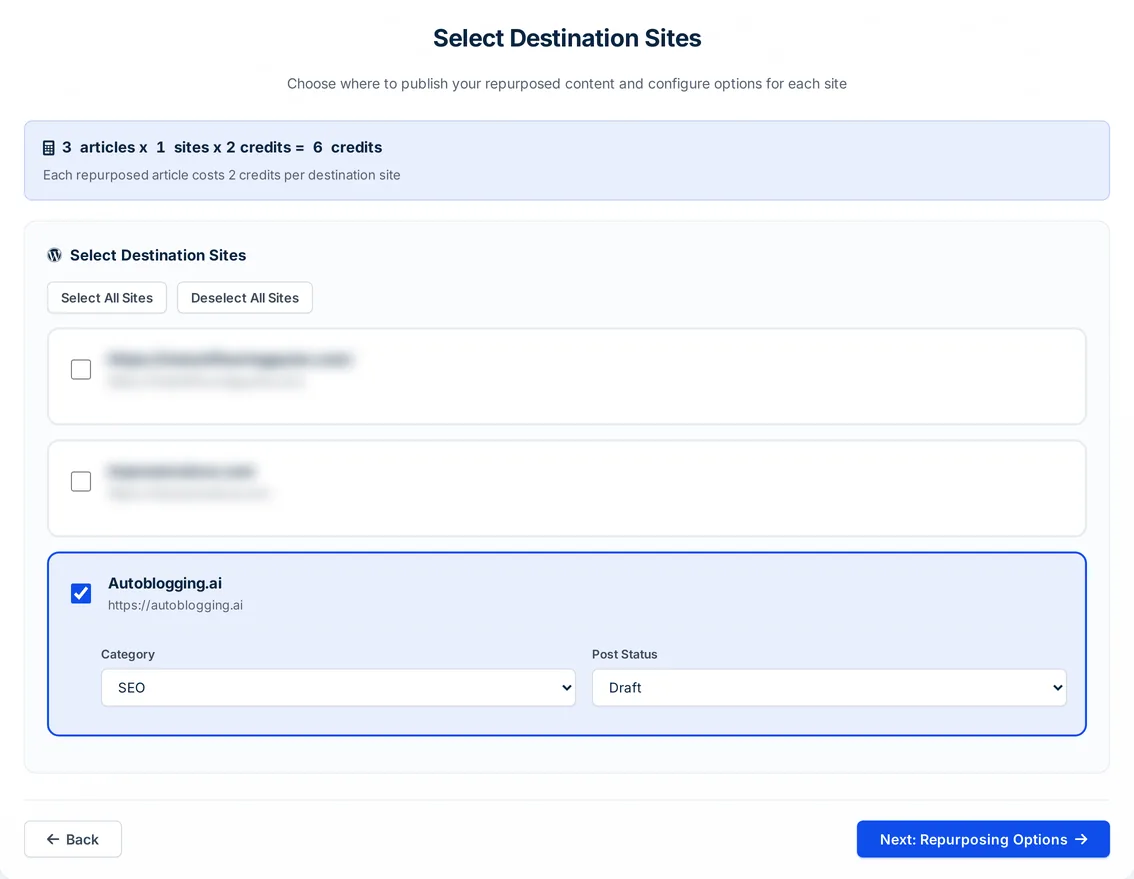
Select one or more of your other WordPress sites and set a category and a Draft or Publish status for each.
Set language and style
Choose the output language and write rewriting instructions of up to 3,000 characters, or leave them empty for a standard rewrite.
Track every post
Each post and destination pair is processed in the background and listed in Content Repurposer history with its source, destination, language and status.
What the content repurposing tool does
One archive, rewritten for every site you run.
One source, many sites
Every selected post is rewritten separately for each destination site, so each site gets its own version.
Rewritten to be unique
Each version is rewritten to keep the information and value while being original enough to avoid duplicate content issues.
Translation into 38 languages
Pick English UK, Spanish, German, Japanese, Arabic, Hindi and more; the article and its title are translated.
Your rewriting instructions
Up to 3,000 characters on tone, length, structure or audience, applied by the same guideline-following editor as the AI proofreader.
Category and status per site
Each destination gets its own category and its own Draft or Publish status.
Your whole archive
Posts are fetched from the source through the Autoblogging.ai WordPress plugin or the WordPress REST API, with a category filter and page or full selection.
Plugin or REST API publishing
Repurposed posts are published to sites connected with the Autoblogging.ai plugin or with WordPress login details.
Cost shown before you start
The form shows articles x sites x 2 credits, and your balance, before you submit.
Failed jobs refunded
A rewrite under 500 characters is never pushed to WordPress. Any job that fails, including a WordPress error, gets its 2 credits back automatically.
Content repurposing tool pricing
Each repurposed article costs 2 credits per destination site, so 10 posts sent to 3 sites cost 60 credits. It is included from the Starter plan and needs at least two connected WordPress sites, one source and one destination, so in practice Regular ($49 a month, 3 sites) or above.
Content repurposing tool FAQ
What does the content repurposing tool do?
It takes posts from one of your WordPress sites, rewrites each one with your instructions, optionally translates it, and publishes it to your other WordPress sites as a draft or a live post.
How much does the content repurposing tool cost?
2 credits per article per destination site. The form shows the total before you submit.
Will repurposed posts count as duplicate content?
Each destination gets its own rewrite, made with an instruction to be original enough to avoid duplicate content issues. Publish as drafts first and review them if uniqueness matters to you.
Which languages can I repurpose into?
38, including English US and UK, Spanish, French, German, Brazilian Portuguese, Japanese, Korean, Chinese Simplified, Arabic and Hindi.
Which plan do I need for content repurposing?
It is included from Starter, but it needs at least two connected WordPress sites, one source and one destination. Starter connects 1 site, so in practice you need Regular ($49 a month, 3 sites) or above.
Can I repurpose to Medium, Shopify or other platforms?
No. Sources and destinations are WordPress sites connected through the Autoblogging.ai plugin or the WordPress REST API.
Related tools
Get started with the content repurposing tool
Create a free account with 10 free credits a month for Quick Mode, then unlock the content repurposing tool on the Regular plan ($49 a month) or above. No credit card required to sign up.
Start free →