
Home / Features / WordPress post optimizer
Site OptimizerWordPress Post Optimizer: Upgrade Your Published Posts in Batches
Autoblogging.ai's Site Optimizer is a WordPress post optimizer that fetches the published posts from your connected site, lets you pick them by hand or by category and upgrades them in one batch. Choose what to add, such as FAQs, schema markup, internal and external links, AI images or keywords from a SERP analysis, and each optimized post is written back to the same WordPress post, with the original kept so you can restore it.
- 1 credit per post, plus options
- Starter plan and up
- Original kept for one-click restore
What is a WordPress post optimizer?
A WordPress post optimizer improves articles that are already live instead of writing new ones. Older posts already have their URLs, links and history, so the job is to add what they are missing: an FAQ section, schema markup, internal links, images or the terms that ranking pages use. Autoblogging.ai's Site Optimizer does this in batches. It reads your posts through your WordPress connection, applies the upgrades you pick and updates each post in place.
How the WordPress post optimizer works
Connect WordPress
Connect your site under Integrations > Connected WP Sites, with the Autoblogging.ai plugin or the WordPress REST API. Every connected WordPress site appears in the Site Optimizer.
Fetch and select posts
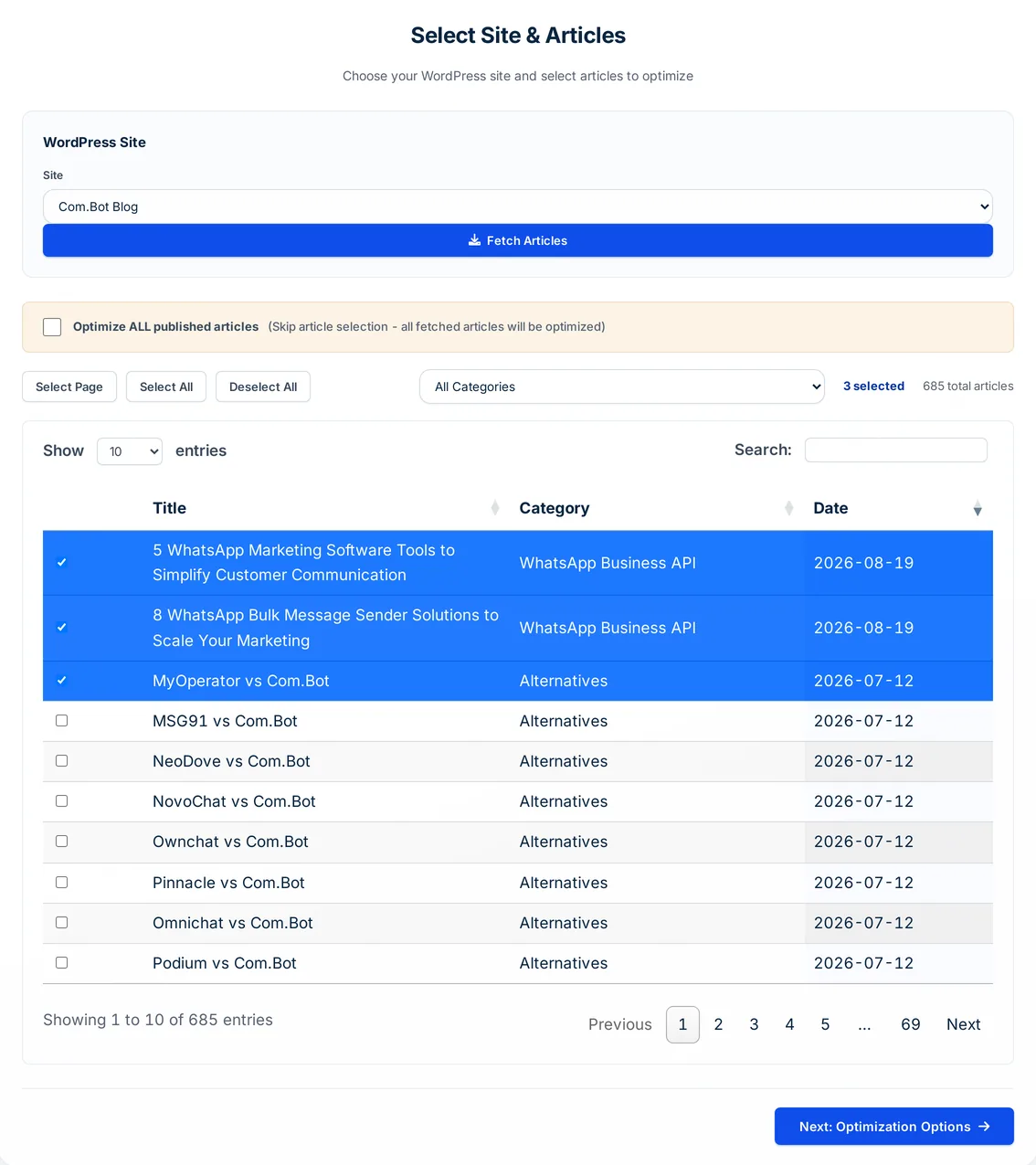
Pick the site and click Fetch Articles. All published posts load into a table you can filter by category, select page by page, or optimize all at once.
Choose the upgrades
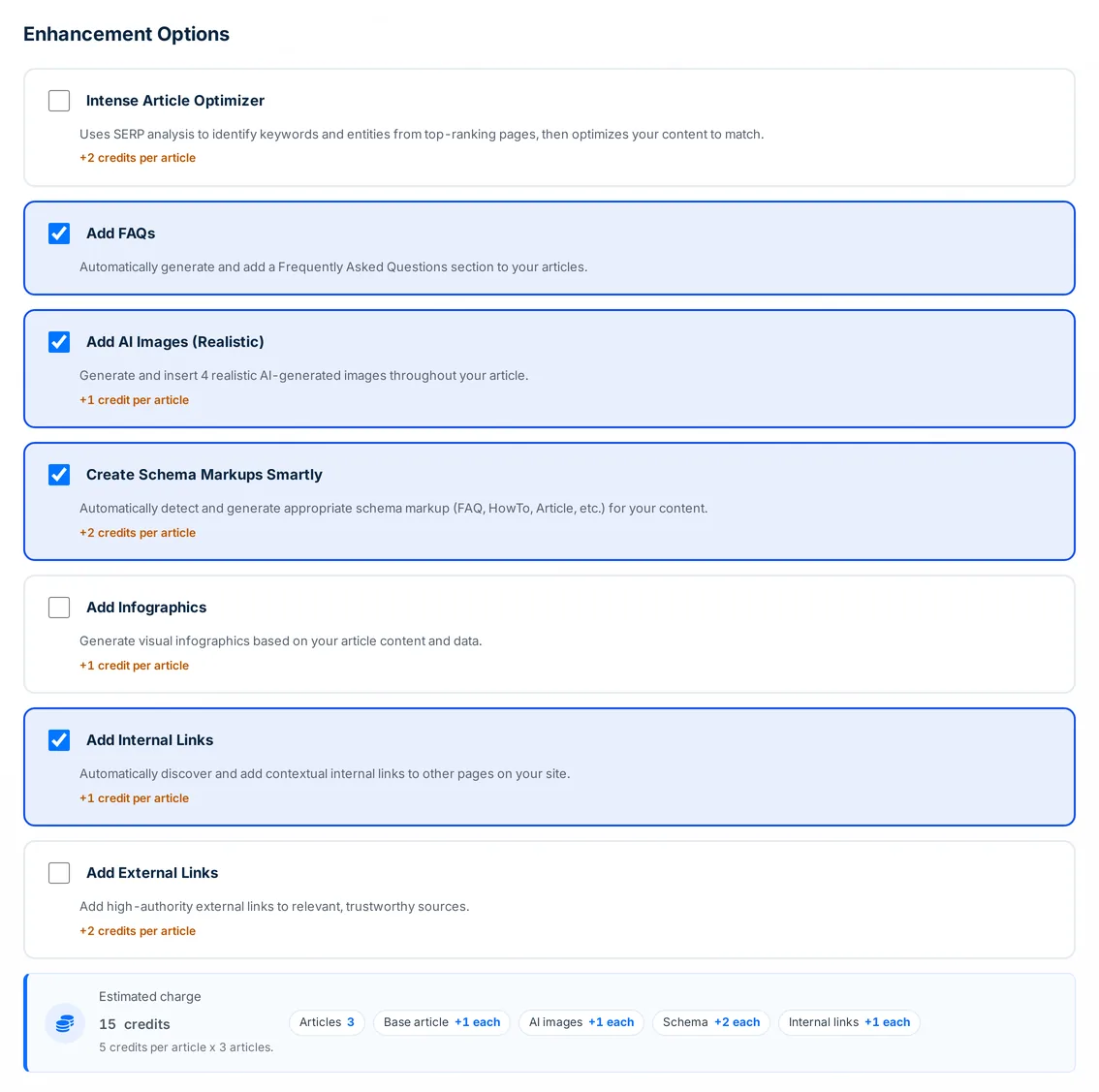
Tick the enhancements you want and, if you like, add a custom writing style instruction. The estimate shows the credit total for the whole batch before you start.
Schedule and run
Set a time gap between posts, or 0 to run them all now, and click Start Optimization. Each post is updated on WordPress and saved under History > Site Optimizer.
What the Site Optimizer can add to each post
Pick any mix of options for a batch; every option is applied to every selected post.
Intense Article Optimizer
Runs a SERP analysis on the post title and works the keywords and entities from the ranking pages into the text. +2 credits per post.
FAQ section
Writes a Frequently Asked Questions section and adds it to posts that do not already have one. No extra credits.
Smart schema markup
Detects the schema types that fit the post, such as FAQ, HowTo or Article, and sends the JSON-LD with the update. +2 credits.
AI images
Generates 4 realistic images and places them through the post. +1 credit.
Infographics
Builds infographics on the post's topic and inserts them where they fit. +1 credit.
Internal links
Adds contextual links to other pages on the same connected site. +1 credit.
External links
Adds links to relevant outside sources. +2 credits.
Custom writing style
Give up to 3,000 characters of instructions, such as shorter sentences or a friendlier tone, and the post is reworked to follow them. No extra credits.
Restore the original
Every optimized post keeps its original version. Switch between the two and push either one back to WordPress.
Site Optimizer pricing
Each post costs 1 credit, plus the options you tick: Intense Article Optimizer +2, smart schema +2, external links +2, AI images +1, infographics +1 and internal links +1. FAQs and a custom writing style add nothing. The Site Optimizer is on every paid plan from Starter ($19 a month, 40 credits), and the estimate shows the batch total before you start.
WordPress post optimizer FAQ
What is a WordPress post optimizer?
A tool that improves posts already published on your WordPress site. Autoblogging.ai's Site Optimizer fetches your posts, adds the upgrades you choose and updates each post in place.
How much does the WordPress post optimizer cost?
1 credit per post plus the options you tick: +1 for AI images, infographics or internal links, +2 for the Intense Article Optimizer, smart schema or external links. It needs the Starter plan or above.
Does it create new posts or change my titles?
Neither. It writes back to the same WordPress post and keeps the original title; only the content (and schema, if you chose it) is updated.
Can I undo the changes?
Yes. Open the post from your Site Optimizer history, look at the Original Content tab if you want to compare, and click Restore Original Content to push the old version back to WordPress.
What happens if a post fails?
If a post cannot be optimized or the update to WordPress fails, it is marked Refunded and its credits are returned to your balance.
Can I spread the updates out?
Yes. Set a time gap in minutes, hours or days: the first post runs straight away and the rest follow at that interval. Set it to 0 to run them all now.
Which sites can I optimize?
Any WordPress site you have connected in Autoblogging.ai, through the plugin or the REST API. Update to the latest plugin first, as the dashboard advises.
Related tools
Get started with the WordPress post optimizer
Create a free account with 10 free credits a month for Quick Mode, then unlock the WordPress post optimizer on the Starter plan ($19 a month) or above. No credit card required to sign up.
Start free →