
Home / Features / keyword insertion tool
Intense Article OptimizerKeyword Insertion Tool: Work Missing Keywords Into Your Article
Autoblogging.ai's Intense Article Optimizer is a keyword insertion tool for content you already have. Paste the article as HTML with the keywords you want covered, one per line, and it rewrites only the passages where each missing term fits, leaves your headings untouched and shows which keywords went in and which did not. Each run costs 1 credit.
- 1 credit per article
- Starter plan and up
- Headings left untouched
What is a keyword insertion tool?
A keyword insertion tool adds specific terms to existing content without rewriting the whole piece. Instead of regenerating an article to cover a missing entity or phrase, Autoblogging.ai's Intense Article Optimizer finds a passage where each term belongs, rewrites that passage to include it and leaves the rest of the article as it was. Terms the article already uses are skipped.
Keyword insertion tool: before and after
Passage before (article "Can Bunnies Eat Okra", HTML as submitted)
Same passage after Intense Optimizer
Can rabbits have okra regularly, or should it be limited?
Feeding okra to bunnies should be done in moderation to prevent any potential adverse reactions or digestive issues. While okra can be a healthy addition to a rabbit's diet due to its high fiber content and essential nutrients, excessive consumption can lead to gastrointestinal disturbances such as bloating, diarrhea, or stomach upset. Can rabbits eat okra pods safely, or are they a potential choking hazard? It is generally recommended to offer rabbits a small amount of okra as an occasional treat rather than a regular staple in their meals. …- Keywords worked into this passage (highlighted): can rabbits have okra, can rabbits eat okra pods
- Across the whole article: 3 of the 23 submitted phrases were present before, 22 of 23 after
Real output from an Autoblogging.ai run, copied as stored and shortened.
How the keyword insertion tool works
Name the job
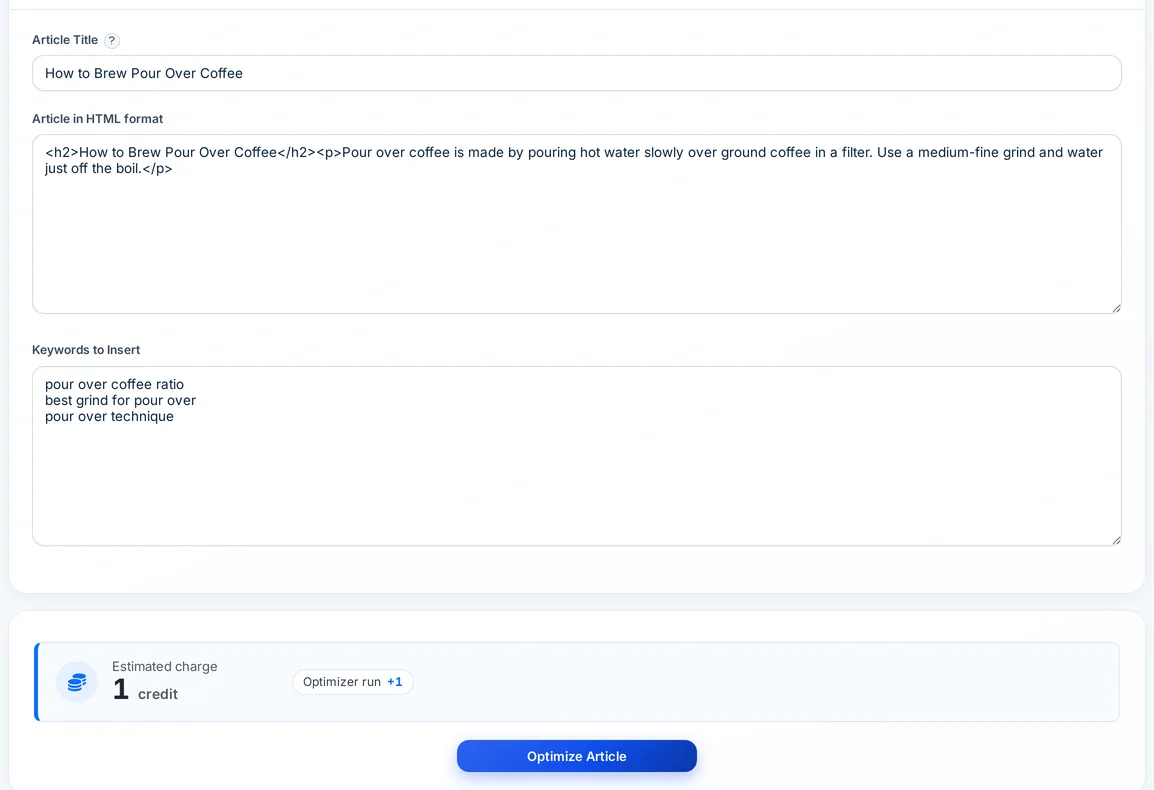
Enter the article title or any label you will recognise later under History > Intense Optimized Articles.
Paste the article HTML
Paste the full article in HTML, so links, lists and formatting stay in place.
List the keywords
Add the terms to insert, one per line: missing attributes or n-grams from a semantic SEO analysis, terms from your keyword research, or entities the ranking pages use.
Optimize and review
Click Optimize Article. 1 credit is charged and the job runs in the background; the result shows the updated article with Keywords Inserted and Keywords Not Inserted lists.
How the Intense Article Optimizer inserts keywords
It edits passages, not the structure, so the article you approved stays recognisable.
One passage per term
For each missing term it picks the most relevant passage and rewrites that passage to include it.
Headings stay as written
H1 to H6 headings are protected before any edit, so keyword insertion never changes your outline.
Existing terms are skipped
Terms the article already contains are left alone instead of being added again.
Long articles in sections
Articles are handled in sections of about 10,000 characters split at H2 and H3 headings; a keyword placed in one section is not forced into the next.
Inserted and not inserted
The result lists every keyword found in the final text and every one it could not place.
HTML in, HTML out
Paste HTML and get HTML back; edits are made inside your existing markup, so the structure around them stays as it was.
Built into the writer
Tick Intense Optimize when writing an article (+1 credit) and the draft gets the same pass, with keywords for its title, or SERP keywords and entities when SERP analysis is on.
Part of the Site Optimizer
Run it across published WordPress posts in a batch, with keywords from a SERP analysis of each post title (+2 credits per post).
Export or publish
Copy the result, export it as HTML, Markdown, Word or PDF, or publish it to a connected site.
Intense Article Optimizer pricing
The standalone Intense Article Optimizer costs 1 credit per article and is included on every paid plan from Starter ($19 a month, 40 credits). As an option inside the article writer it adds 1 credit per article, and in the Site Optimizer it adds 2 credits per post because it also runs a SERP analysis.
Keyword insertion tool FAQ
What does a keyword insertion tool do?
It adds specific keywords to an existing article. Autoblogging.ai's Intense Article Optimizer finds a fitting passage for each missing term, rewrites just that passage and leaves headings and the rest of the article in place.
How much does the keyword insertion tool cost?
1 credit per article on the standalone page, which needs the Starter plan or above. The Intense Optimize option in the article writer is also 1 credit.
Will it stuff keywords into my article?
It aims to place each missing term once, in the most relevant passage, and skips terms that are already there. A term placed in one section is not pushed into the next.
Does it change my headings?
No. Headings are set aside before any edit is made and put back unchanged afterwards.
What if a keyword does not fit?
It appears under Keywords Not Inserted, so you can work it in by hand or drop it.
How should I enter the keywords?
One keyword per line. Commas inside a keyword are removed, so write phrases without them.
Can I optimize posts that are already on WordPress?
Yes. The Site Optimizer can run the Intense Article Optimizer across published posts and update them on WordPress, at 2 extra credits per post.
Related tools
Get started with the keyword insertion tool
Create a free account with 10 free credits a month for Quick Mode, then unlock the keyword insertion tool on the Starter plan ($19 a month) or above. No credit card required to sign up.
Start free →