
Home / Features / free AI article generator
Quick ModeFree AI Article Generator: Write One SEO Article at a Time With Quick Mode
Quick Mode is Autoblogging.ai's free AI article generator: enter a title, pick the language, length, article type, tone and writing style, and it writes the full article for you. Add FAQs, four AI images or an analysis of the pages already ranking for your title as you need them. It works on every plan, including the Free plan with 10 credits a month.
- From 1 credit per article
- Included on the Free plan
- 38 languages
What is a free AI article generator?
A free AI article generator writes a complete article from a title or keyword without a paid subscription. In Autoblogging.ai that is Quick Mode: one form, or a 13-step wizard, that turns your title into a structured article in any of 38 languages, using the type, length, tone and style you choose. Free accounts get 10 credits a month; a plain article costs 1 credit and AI images add 1.
How the free AI article generator works
Open Quick Mode
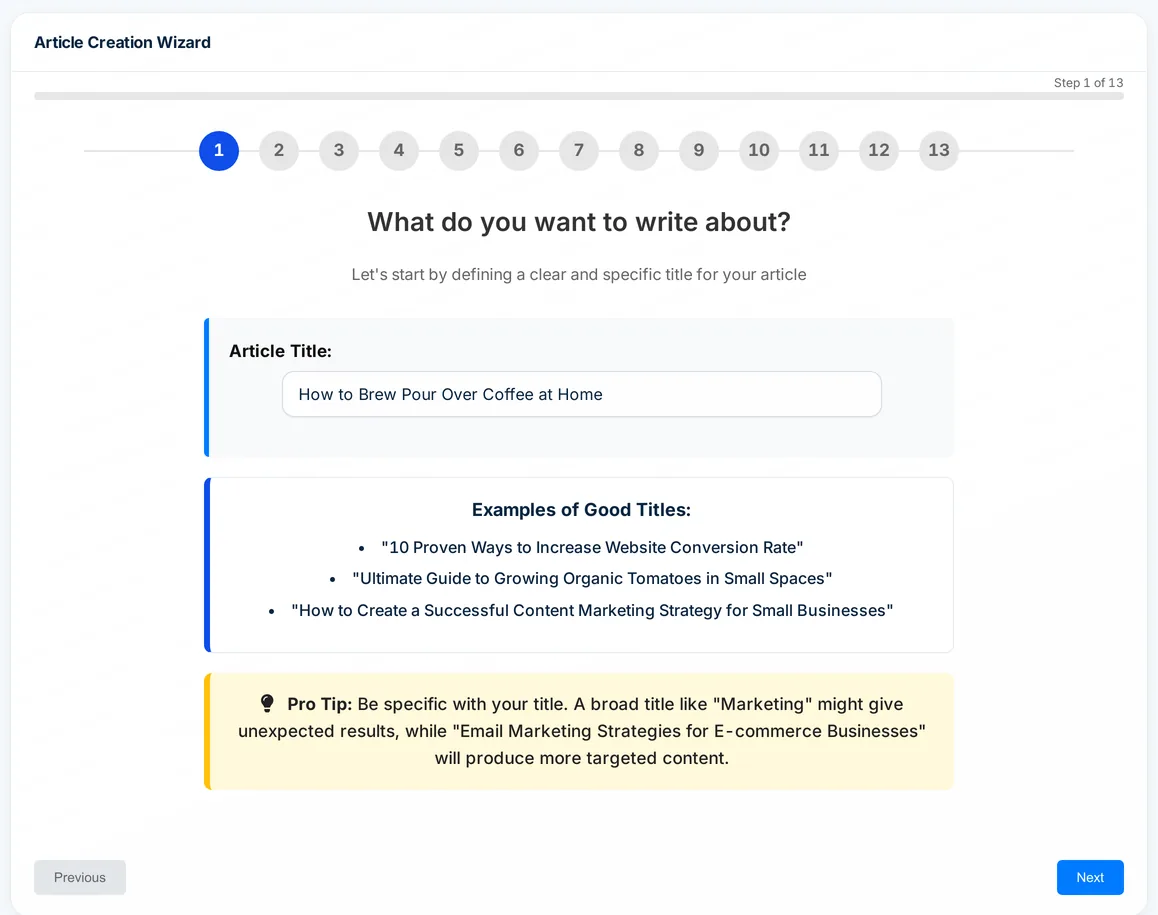
Go to Generate, Quick Articles and choose Single for the one-page form, or Wizard for 13 guided steps that explain each setting.
Enter your title
The title becomes the article's H1 and sets its focus, so write it the way people search. Then pick the language, length, type, tone and writing style.
Choose the extras
Tick FAQs, AI images, SERP Analysis, links, proofreading or auto-posting. The estimated charge updates as you tick, before any credit is spent.
Generate and use it
The progress page updates until the article is ready. Then edit it, export it as HTML, Markdown, Word or PDF, or publish it to a connected site.
What you can set in Quick Mode
One form covers the whole article, and every paid add-on shows its credit cost next to it.
Article types
Informative, listicle, places (local, with SERP Analysis) and service or landing pages. Pick a saved brand to unlock comparison, brand listicle and press release types.
Length and tone
Short, Medium or Long sets how many sections the outline gets. Tone can be automatic, first, second or third person.
10 writing styles
Professional, Conversational, Witty, Humanized, LLM-Friendly and more, or describe your own style in up to 500 characters.
38 languages
English US and UK plus 36 more. Articles in a language other than English cost 1 extra credit.
AI images
Four realistic images placed through the article, with alt text taken from the headings. On by default, for 1 credit.
SERP Analysis
For 1 credit it reads the top-ranking pages for your title and writes from their entities, keywords and outlines. It also unlocks source context, key takeaways, external links and a YouTube embed.
FAQs, schema and fact checks
A free FAQ section, Smart Schema markup for 2 credits and, from the Starter plan, a fact checker that adds sourced statistics for 2 credits.
Brand facts
Choose a saved brand and its verified facts and writing style go into the article at no extra cost.
Publishing
Send the finished article to a connected WordPress, Shopify, Webflow, Ghost or Zapier account as a draft or a live post. Connected sites come with paid plans.
Free AI article generator tutorial
Quick Mode pricing
A Quick Mode article costs 1 credit, plus 1 for AI images (ticked by default), 1 for SERP Analysis and 1 for any language other than English. Every other add-on shows its price on the form. Quick Mode is on every plan, including Free with 10 credits a month; paid plans start at Starter ($19 a month, 40 credits).
Free AI article generator FAQ
Is the free AI article generator really free?
Yes. The Free plan includes Quick Mode and 10 credits a month with no credit card. A plain English article costs 1 credit and AI images add 1, so the free credits cover 5 to 10 articles a month. Free credits reset each month and do not roll over.
What can the free AI article generator write?
Informative articles, listicles, local places articles and service or landing pages, in 38 languages. With a saved brand it also writes brand comparisons, brand listicles and press releases.
What is the difference between Quick Mode and Godlike Mode?
Quick Mode writes from your title and settings, with SERP Analysis as a 1-credit option. Godlike Mode is a separate page where you choose the competitor pages, review the keywords, entities and outline it finds and edit them before it writes (3 credits, Starter plan and up).
Can I publish straight to WordPress?
Yes, once a site is connected under Integrations. Paid plans include connected sites (1 on Starter, 3 on Regular, 5 on Standard, 20 on Gold); the Free plan does not include one, so free articles are copied or exported instead.
How long is a Quick Mode article?
You choose Short, Medium or Long. Length sets how many sections the outline has, and the final word count depends on the topic.
What happens if an article fails?
Open Quick History and click Get Credit Refunds for Failed Generations. The credits for every failed article go back to your balance.
Related tools
Try the free AI article generator
Every new account gets 10 free credits a month. No credit card required.
Start free →