
Home / Features / SERP analysis tool
Godlike ModeSERP Analysis Tool: Turn the Pages That Rank Into Your Article Plan
Godlike Mode is Autoblogging.ai's SERP analysis tool: it searches Google for your keyword, lets you choose which ranking pages and AI Overview sources to study, and pulls out the keywords, entities and headings they share. You review and edit that research and the outline, then it writes the article from your edited plan, with a keyword optimization pass built in.
- 3 credits per article
- Starter plan and up
- Top 20 results plus AI Overview sources
What is a SERP analysis tool?
A SERP analysis tool reads the pages that already rank for a search and shows what they have in common: the topics they cover, the terms and entities they use and how their headings are structured. Done by hand, that means opening every result and taking notes. Godlike Mode does that reading for the results you select, rates each keyword and entity high, medium or low, and turns the findings into an outline you can edit before the article is written.
How the SERP analysis tool works
Enter the keyword
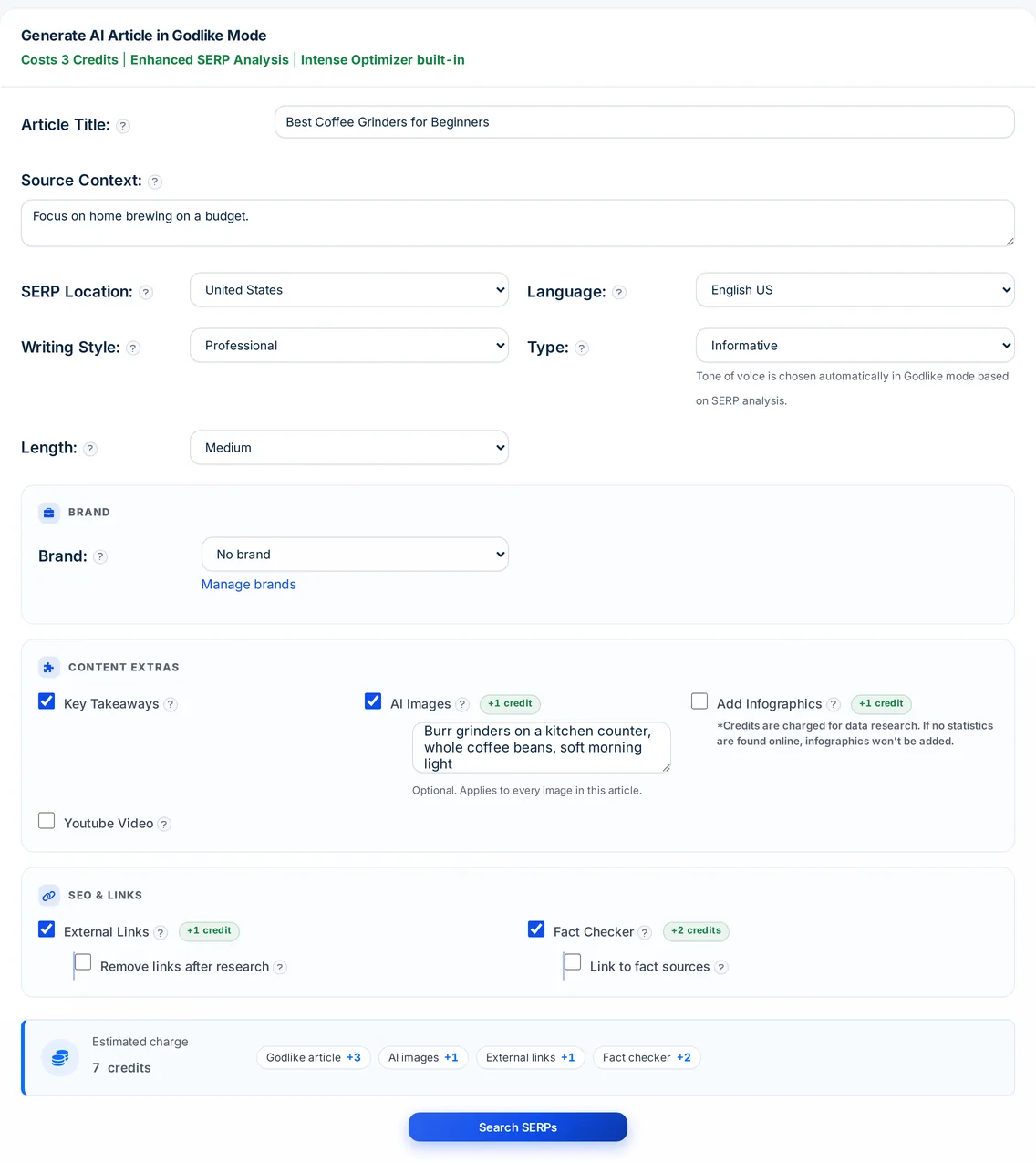
Open Generate, Godlike. Add the title, SERP location, language, type, length and style, plus optional source context, then click Search SERPs. The search is not charged.
Choose the pages
Tick pages from up to the top 20 organic results; sources cited in Google's AI Overview come pre-ticked. Add up to 10 URLs of your own and, if you like, ask for an outline built from the competition.
Review the research
Click Research SERPs, which is when the 3 credits are charged. You get the keywords and entities found, competitor heading ideas, outline gaps and AI Overview sources. Remove terms, add your own and edit the outline.
Generate the article
Click Generate Article. It is written from your outline, keywords and entities and saved under Godlike Articles in your history.
What Godlike Mode analyses and lets you control
Every step of the research is on screen, so you decide what goes into the article.
Competitor selection
Up to the top 20 organic results for your keyword and country, with pages cited in Google's AI Overview marked and pre-selected.
Your own URLs
Add up to 10 more pages to analyse, such as a rival that does not rank in your country yet.
Keywords and entities
The terms and entities the chosen pages share, each rated high, medium or low. Delete any, clear a list or add your own.
Content intelligence
Competitor heading ideas, essential article terms, heading terms from competitors and outline gaps to add, each with a copy button.
AI Overview sources
When Google shows an AI Overview for the keyword, its cited sources are listed and analysed with the organic results.
Outline from the competition
Optionally build the outline from the headings of the pages you chose, then edit it and check the final preview.
Country and language
Read the results of the country you target and write the article in any of 38 languages.
Built-in keyword pass
Every Godlike article gets an Intense Optimizer pass that works the chosen keywords and entities into the text, at no extra cost.
Add-ons
Key takeaways and a YouTube embed for free; AI images, infographics and external links for 1 credit each; the fact checker for 2.
SERP analysis tool tutorial
Godlike Mode pricing
A Godlike Mode article costs 3 credits, charged when you click Research SERPs. Searching first is free, and if the analysis fails the credits are refunded. AI images, infographics, external links and premium writing styles add 1 credit each and the fact checker adds 2. Godlike Mode is included from Starter ($19 a month). The lighter SERP Analysis option on the Quick, Wizard and Bulk forms adds 1 credit per article.
SERP analysis tool FAQ
What does a SERP analysis tool do?
It reads the pages ranking for a search and summarises what they cover. Godlike Mode then uses that analysis, after your edits, to plan and write the article.
How much does the SERP analysis tool cost?
3 credits per Godlike article, on every plan from Starter. Searching for results is free; the credits are taken when the analysis runs.
What is the difference between Godlike Mode and the SERP Analysis option?
The SERP Analysis option on the Quick, Wizard and Bulk forms costs 1 extra credit and analyses the top results automatically. Godlike Mode lets you choose the pages, see the research and edit the keywords, entities and outline before anything is written.
Does Godlike Mode use Google's AI Overview?
Yes. When Google shows an AI Overview for your keyword, its cited sources are listed, pre-selected and analysed alongside the organic results.
Can I analyse a competitor that is not in the results?
Yes. Paste up to 10 URLs of your own and they are analysed with the results you tick.
Which countries and languages can I target?
Set the SERP location to read the results of the country you target, and write the article in any of 38 languages.
What happens if the analysis fails?
If the competitor analysis fails, the 3 credits go straight back to your balance. If the article itself fails, use Get Credit Refunds for Failed Generations in Quick History.
Related tools
Get started with the SERP analysis tool
Create a free account with 10 free credits a month for Quick Mode, then unlock the SERP analysis tool on the Starter plan ($19 a month) or above. No credit card required to sign up.
Start free →