
Home / Features / query fan-out tool
Fan Out QueriesQuery Fan-Out Tool: See the Related Searches Behind Your Topic
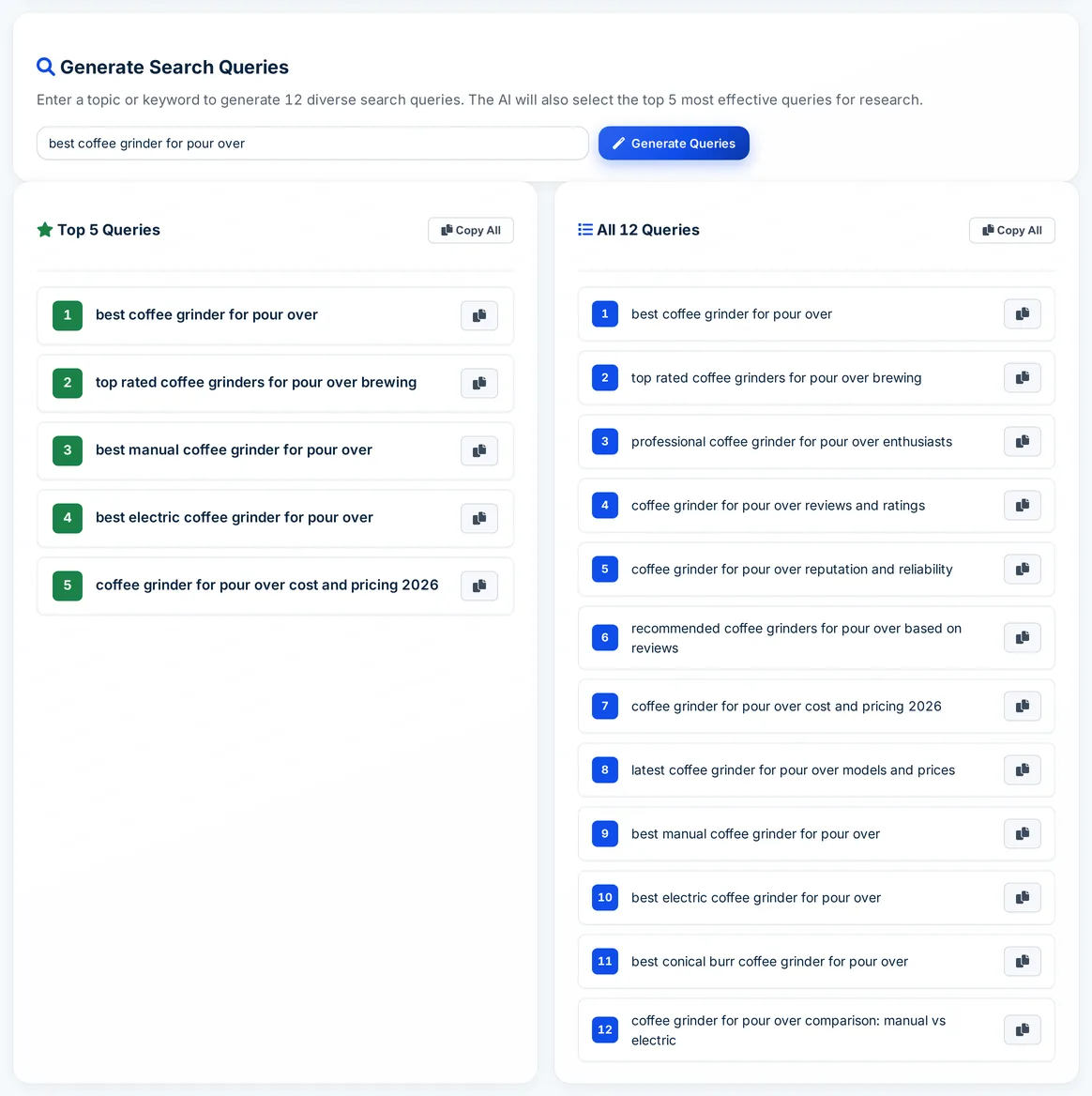
Autoblogging.ai's Fan Out Queries is a free query fan-out tool. Enter a topic or keyword and AI generates 12 related Google searches across buying intent, reviews, pricing, sub-types and comparisons, then picks the 5 most useful. Use them as the sub-questions your content should answer.
- Free, no credits
- Every plan, including Free
- 12 queries, top 5 picked
What is query fan-out?
Query fan-out is how AI search features such as Google's AI Mode handle a question: instead of running one search, they split it into several related sub-queries and combine what they find. A query fan-out tool predicts those sub-queries so you can cover them in your content. Autoblogging.ai's version uses AI to generate them; it does not watch what Google, ChatGPT or Perplexity actually search.
How the query fan-out tool works
Open Fan Out Queries
Find it under Research in the dashboard sidebar. It works on every account, including the Free plan.
Enter a topic
Type a topic or keyword, such as a product category or a service and a city, and click Generate Queries.
Start with the top 5
The 5 strongest queries are shown first, picked for intent, relevance and usefulness, followed by all 12.
Copy and use them
Copy a single query or a whole list into your outline, FAQ section or content plan.
What the 12 fan-out queries cover
Every run follows the same structure, so you get a spread of angles rather than 12 rewordings of one search.
3 high-intent queries
Broad searches for the top, recommended and professional options in the topic.
3 reputation queries
Reviews, ratings and reputation searches people run before they choose.
2 cost and freshness queries
Pricing searches and searches for the latest information.
3 sub-type queries
Searches for the categories and variants inside the topic, worked out from what you enter.
1 comparison query
A head-to-head or alternatives search.
Top 5 picked
The five queries with the strongest intent and relevance are highlighted first.
Local when you say so
Name a city or region and it is kept in the queries; 'near me' is only used when the topic implies it.
No tutorial filler
DIY and how-to style queries are left out, so the list stays on what people compare and choose.
One-click copy
Copy any single query, or all 12 or the top 5 at once.
Fan Out Queries pricing
Fan Out Queries is free. It uses no credits and works on every Autoblogging.ai account, including the Free plan; you only need to be signed in.
Query fan-out tool FAQ
What is a query fan-out tool?
A tool that predicts the related searches an AI answer engine might run for a topic. Autoblogging.ai's Fan Out Queries generates 12 of them and highlights the top 5.
Is the query fan-out tool free?
Yes. It costs no credits and is available on every plan, including the Free plan.
Are these the exact searches ChatGPT or Google's AI Mode run?
No. Their real sub-queries are not visible from outside. The tool uses AI to predict likely ones, so treat them as a planning aid, not a measurement.
How should I use fan-out queries?
Turn the top queries into H2 questions or FAQ entries, check which ones your page already answers, and plan new articles for the rest.
Why are the queries mostly commercial?
The generator is built for high-intent searches: top and recommended options, reviews, cost, sub-types and comparisons. It leaves out DIY and tutorial queries.
Can I use it for a local business?
Yes. Include the city or region in your topic and it is kept in the queries.
Are my results saved?
No. Results are shown on the page only, so copy what you need before you leave.
Related tools
Try the query fan-out tool free
Every new account gets 10 free credits a month. No credit card required.
Start free →