
Home / Features / featured snippet optimizer
Snippet Optimizer writing styleFeatured Snippet Optimizer: Write Articles That Answer First
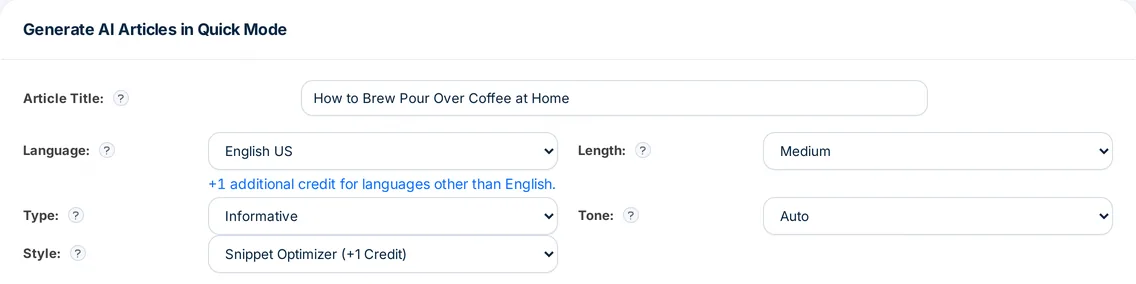
Snippet Optimizer is Autoblogging.ai's featured snippet optimizer: a writing style that shapes every section of an AI-written article for featured snippets. Each section is written to open with a direct answer of 40 to 60 words, followed by numbered lists, bold definitions and short bullet points. Pick it from the Style menu when you write an article; it adds 1 credit.
- +1 credit per article
- Every plan, including Free
- Quick, Godlike and bulk writers
What is a featured snippet optimizer?
A featured snippet optimizer shapes content so a search engine can lift an answer straight out of it: the question in the heading, a short direct answer right under it, then the detail in lists or steps. In Autoblogging.ai it is a writing style rather than a separate tool, so the answer-first structure is built in while the article is written instead of being retrofitted afterwards.
Featured snippet optimizer: before and after
Same title written in another style ("less_ai_words", article "What is SEo", 2025-01-17)
Search Engine Optimization, commonly known as SEO, is the practice of enhancing a website's visibility and ranking on search engines like Google, Bing, and Yahoo.
This complicated field uses various strategies and methods to draw in natural visitors by matching search algorithms that web crawlers use to list and rank content.
Knowing SEO is important for businesses wanting to grow their online visibility and connect with more people, which helps in effectively interacting with their target audience.
…Snippet Optimizer style (article "What is seo", 2025-01-16): heading + first answer
Search Engine Optimization (SEO) is the process of improving a website's visibility on search engine results pages (SERPs) by optimizing content, keywords, and user experience.
SEO involves on-page, off-page, and technical strategies to increase organic traffic and meet user search intent.
…- After answer length: 41 words under the heading
- Both: Quick mode, English, default length, user 68
Real output from an Autoblogging.ai run, copied as stored and shortened.
How the featured snippet optimizer works
Open a writer
Start a Quick Mode article, the step-by-step wizard, Godlike Mode or a bulk batch.
Choose the style
In the Style menu pick Snippet Optimizer (+1 Credit). In the wizard it is the Snippet Optimizer card.
Set the rest as usual
Language, length, FAQs, key takeaways, images and schema all work alongside it, and the credit estimate updates before you generate.
Generate and review
Each section comes back answer-first. Check the opening lines under your question headings, since those are the lines written to be quoted.
What the Snippet Optimizer style does, and where it works
The first five are the instructions the style gives the writer for every section; the rest is where you can use it.
Direct answer first
Each section opens with a direct answer of 40 to 60 words before any detail.
Numbered lists
Steps and sequences are written as numbered lists.
Bold definitions
Key terms get a clear definition, with the term in bold.
Short bullet points
Supporting points are kept concise and set out as bullets.
Summary introduction
The introduction is written from the finished article as 2 to 4 short paragraphs that preview its main points.
FAQs and key takeaways
Add an FAQ section and a key takeaways box from the same form; neither adds credits.
Smart schema
Smart Schema Markups can add FAQ, HowTo and other schema types to the article (+2 credits).
Every writer
Quick Mode, the wizard, Godlike Mode, bulk generation, WordPress bulk, YouTube to Blog and RSS to Articles all offer it.
API
Set writing_style to snippet_optimizer in an API request; the same +1 credit applies.
Snippet Optimizer pricing
The Snippet Optimizer style adds 1 credit to each article, on top of the article's normal cost (a plain Quick Mode article is 1 credit, so 2 in total). Quick Mode is on every plan, including the Free plan's 10 credits a month, so you can try it without a subscription; Godlike Mode, bulk generation and the API need the Starter plan or above.
Featured snippet optimizer FAQ
What does the featured snippet optimizer change in an article?
How each section is written: a direct answer of 40 to 60 words first, then numbered lists, bold definitions and short bullet points, plus an introduction that summarizes the finished article.
How much does the featured snippet optimizer cost?
1 extra credit per article. A Quick Mode article written in the Snippet Optimizer style costs 2 credits before any other options.
Is Snippet Optimizer available on the Free plan?
Yes, in Quick Mode, using the Free plan's 10 monthly credits. Godlike Mode and bulk generation need the Starter plan or above.
Will every article win a featured snippet?
No. Google chooses which page and passage to show. The style puts a short, direct answer at the top of each section, which is the kind of passage featured snippets quote.
Can I use it in bulk?
Yes. Pick Snippet Optimizer in the Style menu of the bulk generator or WordPress bulk, and every article in the batch is written that way for +1 credit each.
Can I combine it with a custom writing style?
No. Snippet Optimizer and Custom Writing Style are options in the same Style menu, so an article uses one or the other.
Related tools
Try the featured snippet optimizer free
Every new account gets 10 free credits a month. No credit card required.
Start free →